

Creating Widgets
A Widget is a modular, visual content block like a Story, Banner, Swipe Card, Vertical Feed, or Canvas. Widgets are goal-oriented, fully customizable, and can be placed and updated through the dashboard without developer effort.
For creating a new widget click on + Create widget in the top left corner. The next steps will be choosing the desired widget and giving a unique name to help you identify it later.
After creating your widget, you can click the 3 dots button to edit their layout and templates (or delete them if you need it) according to your brand.
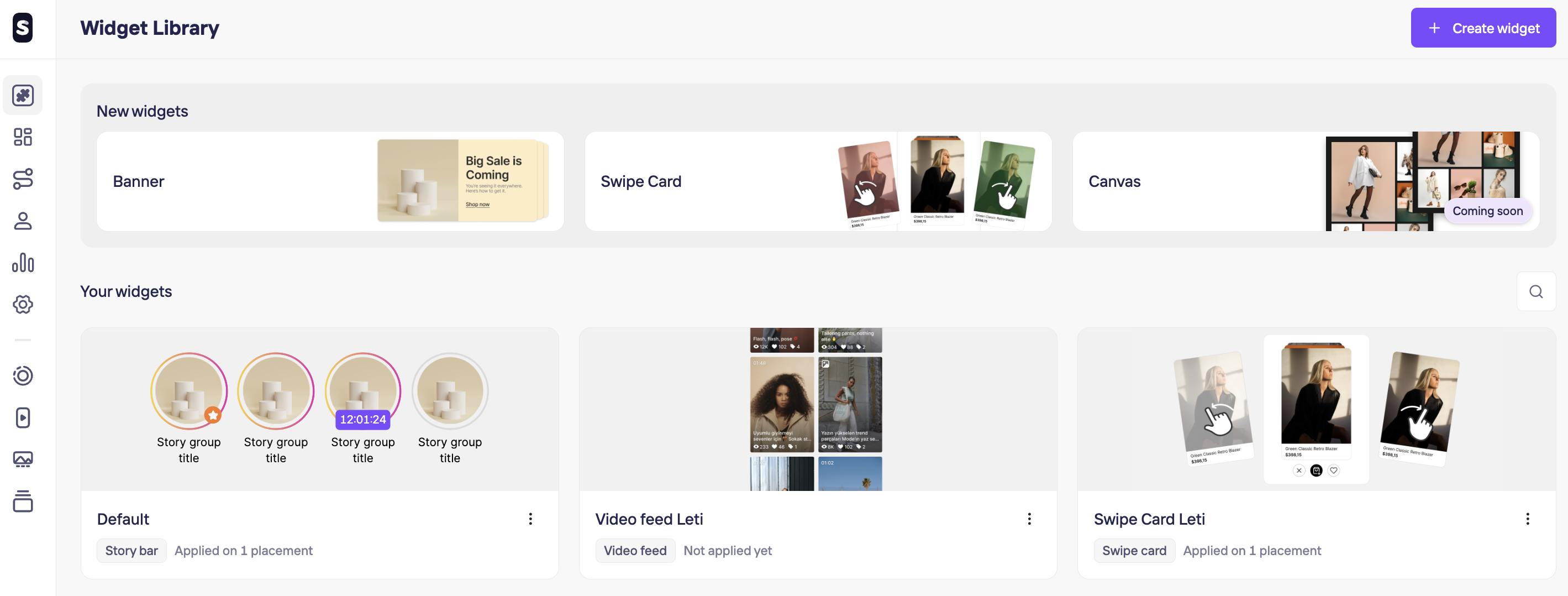
Plug-and-play content formats you can mix and match:
Banner: Use this widget to create banners with image, video or text. Display them as singles or carousels.
Swipe Card: Use this widget to showcase products in an interactive swipeable card format.
Video Feed: Use this widget to show specific videos as a carousel or in grid view on any page of your store.
Story bar: Use this widget to showcase products in an interactive swipeable card format.
Canva(Coming soon): Use this widget to create layouts combining images and videos for dynamic visual experiences.
Updated 10 months ago